What's new

What changed in DudeCovers, week by week. The book studio opened on 1 October 2026; the weeks before it are the studio it’s built on.

November 2026

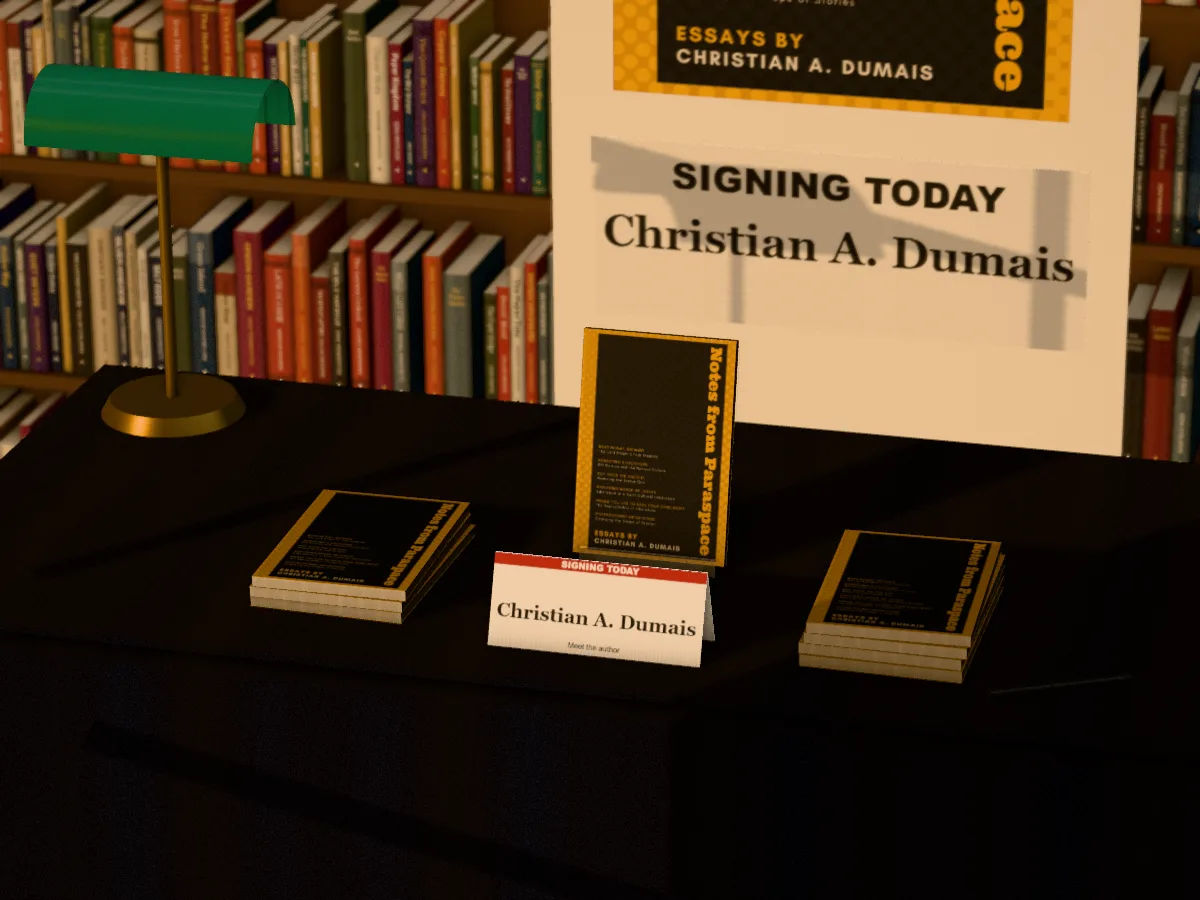
New 3D set: the signing table

New · Pro

New 3D set: the signing table

Piles of your book on a signing table, one on a stand, your cover on the pull-up banner and your name on the card. In a bookshop, under a book festival tent or in a library.

See the set
The signing table 3D set with an author's book in it

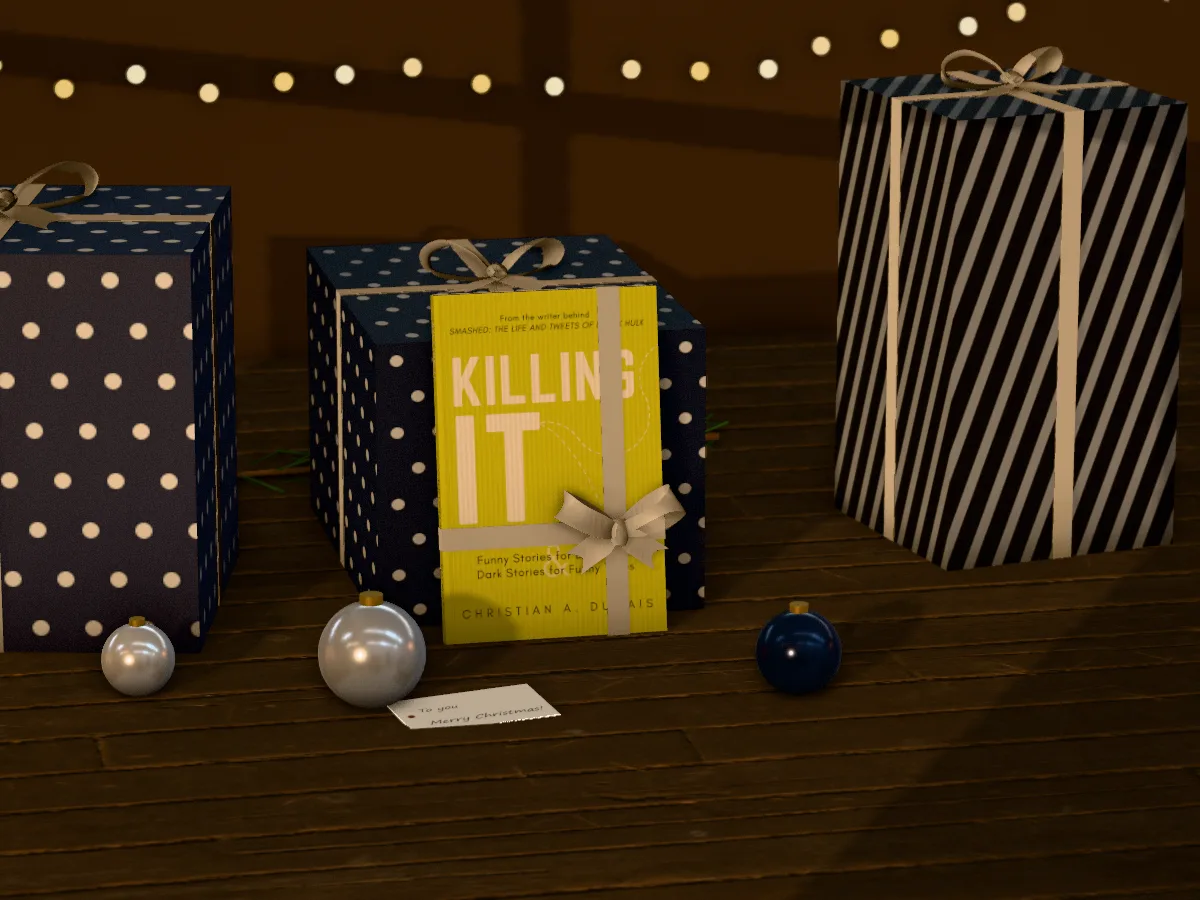
New 3D set: Christmas

New · Pro

New 3D set: Christmas

Your book tied in ribbon, leaning on a wrapped present, with baubles, fairy lights and a gift tag in your words. Classic, Nordic or midnight.

See the set
The christmas 3D set with an author's book in it

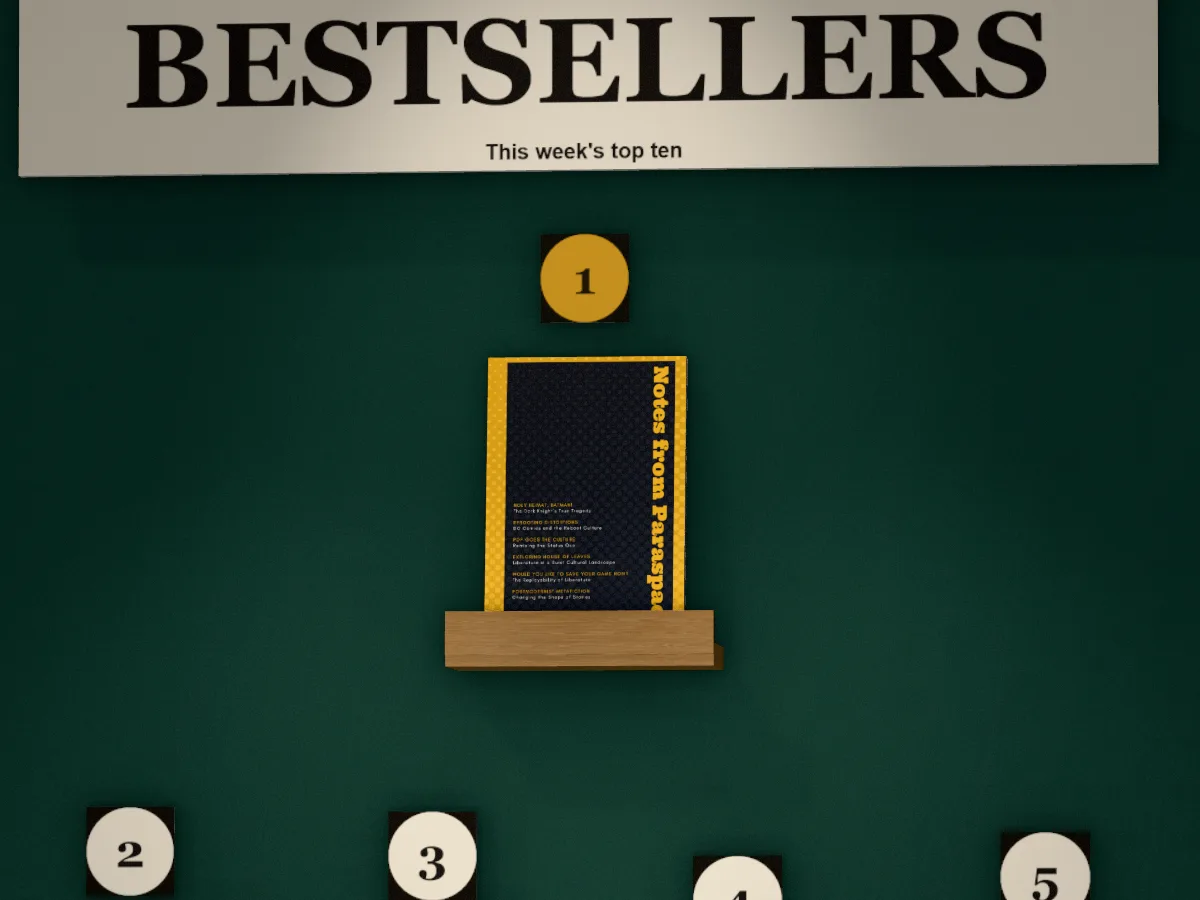
New 3D set: the bestseller wall

New · Pro

New 3D set: the bestseller wall

A bookshop's chart with your book at number 1 and your words on the sign. As a numbered chart, a top 5 or a bookcase, in green, black, cream, oxblood or navy. A series takes the first places.

See the set
The bestseller wall 3D set with an author's book in it

October 2026

Blood: spatter, smear and drips

New · Pro

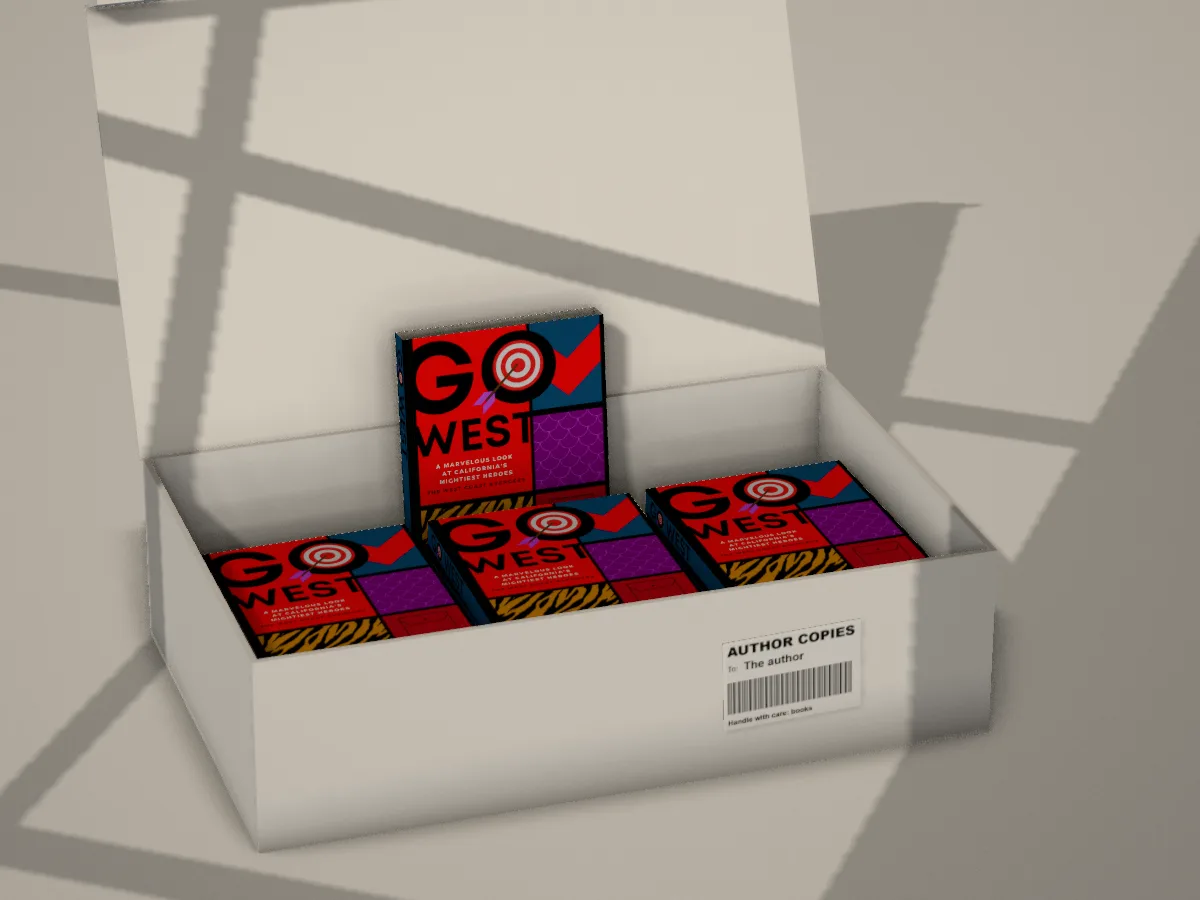
New 3D set: author copies

Your book in an opened box of author copies, one lifted out at the back, with a parcel label in your words. A shipping box, a mailer with the lid lifted or a wooden crate, on floorboards, a pale floor or a rug.

See the set
The author copies 3D set with an author's book in it
New · Pro

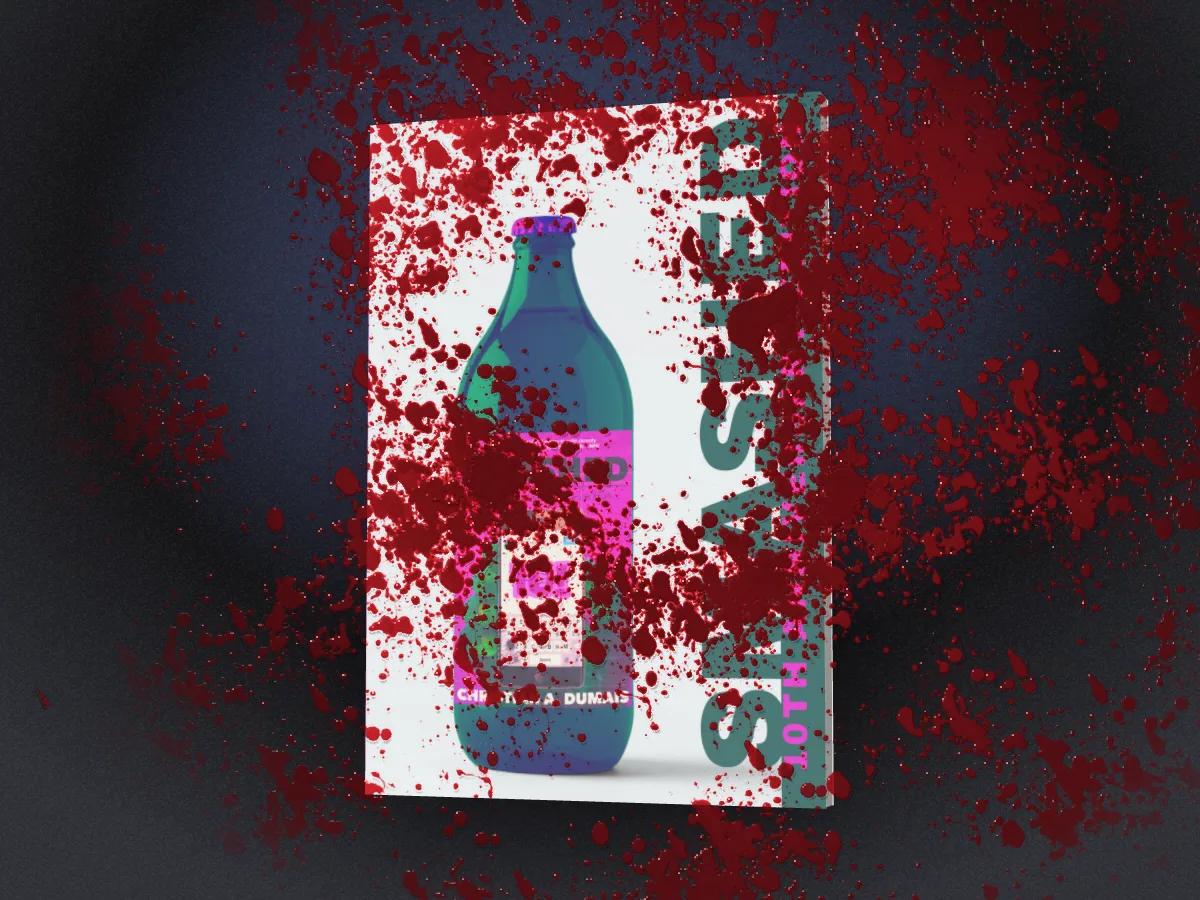
Blood: spatter, smear and drips

Under Surface there's blood now, made from real scanned splatter: a spatter with flecks and mist where it hit, a smear dragged across, or drips running from the top. Fresh is deep red and wet, catching the light; dried is browner and matte. It stains the cover where it's thin and pools where it's thick. For thriller, crime and horror covers.

A thriller paperback with fresh blood spatter across its cover and the backdrop

A free Pro week, and Pro in dollars, pounds or euros

New · Pro

Sprayed, gilt and deckle edges

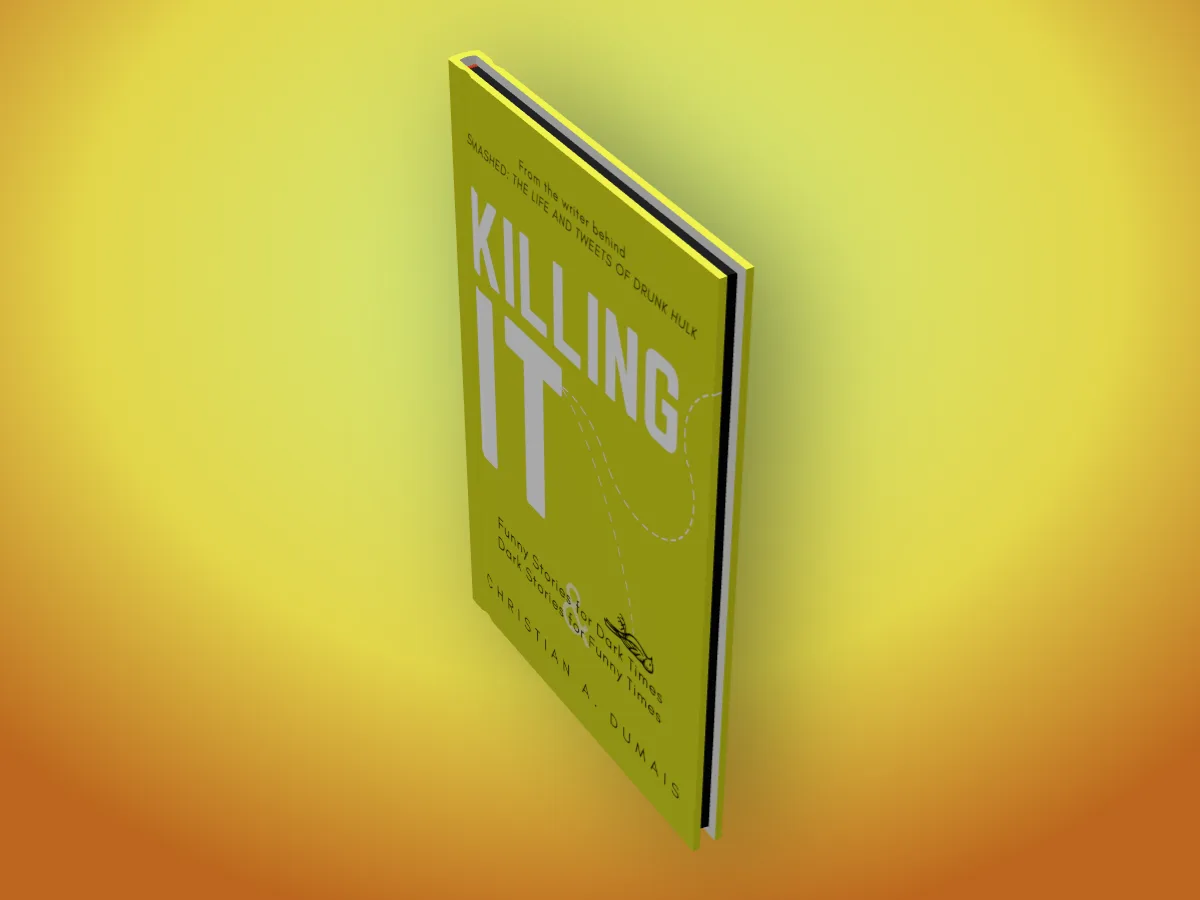
Under Book, Page edges: Sprayed paints the top, side and bottom of the pages in any colour (six ready ones or your own), Gilt lays gold leaf on them that catches the light as the book turns, and Deckle leaves the side rough, each sheet a slightly different length, like a literary hardback.

See the edges
A hardback with black sprayed page edges on a yellow backdrop
New

A free Pro week

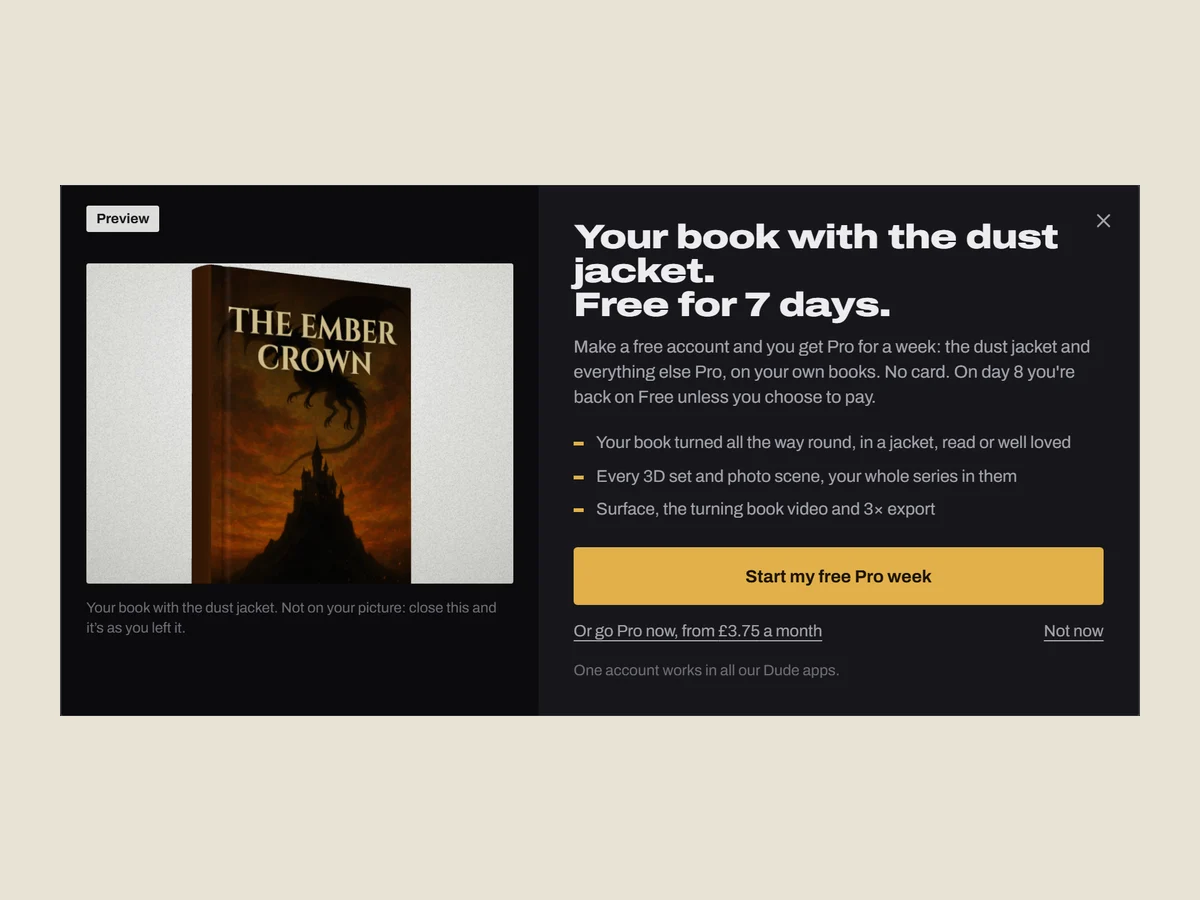
Make a free account and your first 7 days are Pro: your book turned all the way round, every 3D set and photo scene, jackets and wear, Surface, the turning video and 3x export. No card, and it goes back to Free on its own. Click anything Pro on Free and you'll see your own book with it, turning in 3D, before you decide.

The DudeCovers Pro sheet turning the author's own book in 3D: Free for 7 days
Improved

Pay in your own currency

Pro is now priced in US dollars, pounds and euros, and the pricing page shows the one for where you are, with a switch above the prices. $15 a month, $129 a year, or $399 once for Lifetime (£12, £99, £299; €14, €119, €349). Already paying? Nothing changes: you keep the price you signed up at.

See pricing
6 smaller changes
  • A new 3D set opens on its own look, in daylight, instead of keeping the last set's light and colours.
  • A set's own settings (style, colours, words) open right under the set you picked, not at the bottom of the list.
  • In a scene, Backdrop says the scene brings its own room, with a button back to a plain shot.
  • With a series ticked, clicking one of its books in the strip at the top opens that book's settings.
  • The video's Length is now called Speed.
  • The horror and crime sets showed the blood switch twice. Once now.

A cover spread, linen covers, and a truer face-down book

New

Made with DudeCovers

Want to help us grow? Tick Made with DudeCovers in the Export menu and a small badge goes in the bottom corner of your picture: the words and our logo, dark on a light backdrop and light on a dark one, on a soft dark patch over a photo scene or 3D set. It stays out of the way of your own watermark, it's free, and it's off unless you turn it on.

Improved

Pages that look like paper

The page edges of every 3D book are now a real stack of sheets instead of a flat block with lines on: each sheet catches the light, the folded sections show, the pages fall into shadow where they tuck in under the covers, the edge eases in to meet them, and a read copy fans out a little and picks up age spots. A gloss cover on a plain backdrop now reflects a real photo studio, a softbox sliding across it as it turns.

See the 3D book
Improved

Real wood in every 3D set

The library, the bookshop, the home shelf, the new releases table and your backlist are now made of real photographed oak and walnut, with the grain running along each shelf and table top, on real floorboards, with a real plant on the shelf and the room's light reflected in the varnish.

See the scenes
New · Pro

Cover spread

Under Book, Open, pick Cover spread: the cover opened right out and standing, back, spine and front in one piece, with soft hinge grooves and rounded boards, to show your whole wrap at once.

See open books
New

Linen covers

A new finish next to matte and gloss: Linen, a woven cloth cover, for a special edition or a cloth hardback. Free, like matte and gloss.

See hardbacks
Improved

Your book lit by the room

In every photo scene your book now takes the photo's own light: bright in a lamp's glow or a stripe of window light, dimmer in the corners, and tinted like the room, instead of one even light. Drag it into the light and watch it change. Shadows fall the way the photo's own shadows do, soft and fading out, neon spills pink and blue across your cover, and a dim room stays dim. Shadows stop at the edge of the table or shelf and wrap over its front, however big you make the book.

See the rooms
New · Pro

Photo scenes for your genre

Sixteen new rooms, two for each genre: a candlelit table and a moonlit attic for horror, a neon city desk and a clean lab for sci-fi, a playroom and a bedtime shelf for picture books, a tavern map and a misty forest for fantasy, morning linen and a café terrace for romance, a detective's desk and a rainy window for crime, plus a kitchen, an office desk, a beach towel and a poolside. Set your shelf's genre and its rooms come first in the Scene tool.

See the rooms
Improved

3D scenes that look photographed

The library, bookshop, home shelf, new releases table and your backlist now shade where books meet the shelf and each other, keep your book in focus with the rest softer further away, and hold your cover's real colours under the warm lamp and evening light. Window light falls through a pane onto your book instead of a bar across it, the bookshop's prices sit on small tickets, and every set is framed closer on your book. Changing the light is instant now. Prefer it all sharp? Light > Focus > Everything sharp.

See the scenes
New · Pro

Your own price on the shelf

In the bookshop, type your book's price under Shop details and it goes on the shelf-edge label under your book, in pounds, dollars or euros. The other books keep made-up prices.

See the bookshop
Improved · Pro

Face down, like a real book

A book left open face down now rests on its pages the way a real one does: the pages sweep up from both sides and pinch together under a full round spine, every sheet fanning out to the fore-edge, the covers almost flat on top.

See open books
3 smaller changes
  • A book lying face down has truer pages: every sheet fanning out from one point under the spine, the stack bunching up into a shallow tent under a full round spine, lighter page edges with uneven sheet lines, and a softly rounded, slightly fanned fore-edge.
  • The spine of a face-down hardback sits inside the case's roll, leaving a thin dark crescent instead of a black tunnel.
  • Full spin in the Video tool is smooth all the way round: it speeds up gently from rest and slows gently back, instead of stalling just after the start and lurching on.

DudeCovers Pro is here, your book turns on video, opens, takes a bookmark, and comes as an ebook

New · Pro

Design your bookmark

Under Book, Bookmark, Card, pick Design one: type your words for the part that sticks out of the book (Buy this book!, Out now, Signed copy), or put your logo or a QR code there instead, on your cover's colour or one you pick, with your cover below. Christian A. Dumais's idea.

See bookmarks
New · Pro

Your series in a video, on a plinth

Tick two or more of your books and they turn together in the book video, however they stand: in a row, fanned, stacked, spines out or in their slipcase. Put the whole series on one round or square plinth for a launch reel.

See the videos
New · Pro

Ebooks on an e-reader or tablet

Under Book, pick an ebook: your cover on an e-reader in black and white e-ink, a colour e-reader, or a tablet in full colour. Show it on its own or standing beside your book, and put your cover or a page from your interior on the screen. It turns, goes on a plinth and works in the video.

See ebooks
New · Pro

Bookmarks

Under Book, pick a bookmark. Card tucks your own bookmark design into the book, standing up out of the pages, or lying across them when it's open; without a design we make a matching one from your cover. Ribbon adds a satin ribbon marker in one of six colours, hanging from the bottom or running down the gutter.

See bookmarks
New · Pro

Open books

Under Book, pick Open and your book lies open on a table, on a spread from your own interior: add two pages side by side (or one for the right) exported from your interior file. The pages arch up from the spine, the page stack shows at the edges and the boards take your cover's colour. Drag to spin it on the table, tilt to look down on it, or make a video of it turning. Or lay it face down, spine up, so your cover shows while it's open.

See open books
New · Pro

A turning book video

Open Video and your 3D book moves: a slow turn, a gentle sway, a full spin to show the spine and back, or a turn to the back cover and home. Put it on a round or square plinth in white, black or oak, standing on the floor with a soft shadow, or leave it in a scene. Press play to watch it, then download an MP4 for reels, stories and your Amazon page. It starts and ends at your angle, so it loops cleanly.

See it moving
New · Pro

DudeCovers Pro

Every Pro option for keeps, with no preview tape: the 3D book from every angle, the scenes, series and box sets, dust jackets and wear, Surface and 3x export. £45 a year, £5 a month, or £149 once for Lifetime. One Dude account signs you in, and your account page has your receipts.

See pricing
Fixed

The picture shows on iPhone and iPad

On an iPhone the canvas could show only the backdrop, with your book missing, and on an iPad (and in Safari on a Mac) a series in 3D could be missing too. Both show now.

21 smaller changes
  • Click the tool you're already in and its panel goes back to the top.
  • Move your covers around the strip at the top: on a phone, hold one and slide it; with a mouse, drop it on another one. Click Turn or Tilt under the picture to set it back to 0°.
  • Surface paint drips and splatter look like real wet paint now, and the splatter can be several colours (Primary, Neon, Pastel) or one.
  • Surface effects no longer freeze the page the first time you pick one.
  • Picking Open or a bookmark in a scene, or with a series ticked, now says why it isn't showing yet, with a button that puts book one on a plain backdrop for you.
  • The turning book video now turns on the canvas while it plays, sharp, with the plinth and any change you make showing straight away. Before, playing it left the book standing still.
  • An open book's pages now curve down into the middle in a soft fold, not a sharp V.
  • The page edges of an open book show the sheets, curving down into the middle and shaded towards the cover, instead of one block of white.
  • The plinth's shadow on the floor is soft all round; its edges were cut off in straight lines.
  • A book lying open face down has the right shape for its binding: a hardback's boards almost flat with a wide, rounded spine and a groove each side, the headband showing in the hollow; a dust jacket over its cloth case; a paperback's glued spine bowing gently into its covers. The pages arch up under the spine and show their sheets.
  • Hardbacks have a proper hinge groove down the front and back, and covers have a fine paper grain instead of a perfectly smooth surface.
  • A dust jacket shows on an open book: the cloth case under it, the jacket folded round the boards and its flaps peeking out round the pages. A book lying face down rests on its pages like a real one: the covers almost flat on top of the page stacks, a low soft spine between gentle grooves, rounded board edges; and the cut edges of the boards take the cover's own colour.
  • A read or well loved book shows it inside too when it lies open: pages gently toned, a little deeper at the edges, grubby corners where thumbs hold it, and on a well loved copy a few foxing spots, a creased corner, a biro scribble where someone tested a pen, and a dog-eared page.
  • Picking Open, an ebook or a bookmark while in a scene now moves your book to a plain backdrop straight away, and says so.
  • The plinth is in the Book panel now, as well as under Video, so you can take it off from there. It comes off by itself when you pick another book or an ebook device.
  • Ebook is the last thing in the Book panel, after your book's own settings.
  • Zoom and moving the picture work on a book on a plinth and on an open book; they did nothing there. Set the zoom, then export a picture or a video.
  • A book spinning on a plinth no longer seems to grow and shrink as it turns.
  • A Surface effect stays off for the whole of a video, with a note in the Video panel saying why, instead of blinking back on every time you paused.
  • Closing an open book puts it back at the angle it had, instead of leaving it looked down on from above.
  • Picking a plinth for an open book closes the book onto it; picking a bookmark for a face-down book turns its pages up so you can see it.

Box sets, series and genre shelves

Two days after launch: your whole series in one picture, and shelves that suit your genre.

New · Pro

Your words on the staff pick card

In the bookshop and on the new releases table, write the card yourself (heading, note and who signed it) or take it away, and show shelf prices in pounds, dollars or euros, or none at all.

New · Pro

Genre shelves

Pick the genre of the books round yours in the scenes: crime, romance, literary, fantasy and SF, horror, children's, non-fiction or poetry. Their colours and lettering follow it, the bookshop gets a section tab, and the names are made up in the genre's style or real classics long out of copyright.

New · Pro

Box sets and series

Add each book's cover, tick the ones you want, and show them together: side by side, fanned like a hand of cards, in a stack, spines out, or in a slipcase with your series name on it and one book pulled half out. Each book keeps its own size, binding and pages.

See box sets
7 smaller changes
  • In a series, click a book on the canvas or a cover in the strip to change that book, or pick All books on the Book tab to change them together. Each cover in Your books has its own delete
  • Any cover file works on any binding: a full wrap on a dust jacket no longer lands in the wrong place, and a jacket file with flaps works on a hardback or paperback (the flaps are left off)
  • Books in a scene no longer pass through each other, and the staff pick card stands clear of the piles on the new releases table
  • The new releases table has legs, and the shop has walls, so a wide turn never shows the edge of the set
  • The other books' titles read on the new releases table's shelves, and long author names no longer run into the spine's marks
  • Copying one book's size, binding and paper to the rest of a series is now a one-off you can undo, and One book / All books says plainly which you're editing
  • Changing the light, finish or genre no longer redraws every cover, and a series with a slipcase saves faster

Your series in the scenes, and your backlist on a shelf

A series no longer stops at the backdrop: tick your books and put them anywhere a single book goes.

New · Pro

Your series in the 3D sets

Tick two to six of your books and pick a set. In the bookshop they face out side by side in your bay; on the library and home shelves they stand spines out in a run, with one face out or one pulled forward if you like; on the new releases table there's a pile of each, with the one you pick on the stand. Each book keeps its own size, binding and pages, and a click on any of them picks it.

Your series on a shelf
New · Pro

Your backlist

A new 3D set: a wall shelf of only your books, no made-up ones, with a bookend at each end, a plant and a vase. The shelf is sized to however many books you have.

Improved

Try every Pro option on the canvas

Click anything Pro (a scene, a series, the dust jacket, wear, a backdrop, a callout, Surface) and the studio asks once whether you'd like to try it on your picture; say yes and Pro options go straight on for the rest of your visit. The picture carries the preview tape and our name, faint, across it until you go Pro. The strip under the picture names every Pro setting that's on, and Turn off all Pro settings switches them all off in one go (a Pro callout becomes a free one with the same words, never deleted).


New · Pro

Your series on a photo's table

In the photo scenes your books lie stacked with book one on top, spread out side by side, or stand in a row, spines out or in their slipcase. They sit at the table's own angle, cast real shadows from the room's light, and drag and spin together.

Photo scenes
9 smaller changes
  • In the bookshop, the books facing out on the shelves above and below yours stand on their own shelves again (they were standing on yours, through its spines)
  • A big book pulled out of a shelf no longer swings into the books beside it, and books leaning face out stand on the shelf instead of dipping into it
  • The stack of books on the home shelf sits one on another without passing through, and the bookends' feet point away from the books
  • A series facing out in a full bookshop bay no longer stops the 3D book from drawing (it fell back to a flat, stretched cover, and stayed flat)
  • If the browser drops the 3D view (low on graphics memory), the studio draws it again instead of going flat for the rest of the visit; covers you added earlier take less graphics memory
  • The Light tool says when the 3D book can't be drawn, instead of showing settings that do nothing
  • On Free the book turns to 45° either way and stops there, so the preview tape only appears when you pick something Pro (turning past it put the tape on without asking)
  • You can choose several covers at once from the first screen, for a whole series
  • A series standing on a photo's table sits on it, with a soft shadow under each book (it seemed to hover)

DudeCovers opens: your cover on a real 3D book

The book studio, the scenes and the site went live on 1 October, two days after the first 3D book came off the bench.

New

A real 3D book from your print file

Drop in your full wrap or KDP cover PDF and the studio builds the book: the spine sized from your artwork, the trim read from the PDF, page edges in white or cream, matte or gloss. It turns right round to the back.

3D book mockups
New · Pro

Paperback, hardback and dust jacket

One file, three bindings: a softcover, a hardback with boards, hinge and rounded spine, or a jacket with its flaps folded inside. New, read or well loved.

Dust jackets
New · Pro

Shelves, a bookshop and a new releases table

Four sets built in 3D, with daylight, lamp or evening light through a window, blinds or leaves. The other books on them are made up.

See the scenes
New · Pro

Photo scenes

Six real looking rooms: lay your book on the table or stand it up, drag it round, and it casts its shadow from the room's light.

Photo scenes
New

Sizes for book stores

Amazon A+ header (970 × 600), an ebook store cover (1600 × 2560) and the BookBub ad, next to the social sizes.

New

Guides and a spine width calculator

How KDP works out a spine, with a calculator that gives the whole cover size and opens the studio at your trim and page count.

Spine width calculator
4 smaller changes
  • Books in photo scenes sit on the table: a darker line where the book touches it
  • A KDP file on a dust jacket shows the right front cover (the flaps take the cover's edge colour)
  • The windowsill's light no longer blows out white covers
  • The try-it-free note names the scene you're in

September 2026

The studio underneath: real 3D, new backdrops, callouts

Built that week for DudeShots, our screenshot mockup studio, and part of DudeCovers from its first day.

New

A 3D engine in the browser

Real 3D models rendered on your own computer and copied into the picture, so exports are ordinary sharp images at up to three times the canvas.

New

Backdrops from your colours

Colours read from your artwork, eight moods, and 24 styles: light, mesh, patterns and Liquid shapes grown fresh each time.

New

Callouts

Headlines, tape stickers, notes with arrows, badges, big numbers and speech bubbles, typed straight on the picture.

New · Pro

Surface

Rain, condensation, a waterline or paint over the finished picture.

New

Autosave, undo and redo

Your work is kept in your browser between visits, and every change can be undone.

Shaped shadows and clean transparent exports

New

Transparent PNGs that really are

Backdrop: None exports a PNG with a clear background, ready to drop into Canva, an ad or a web page.

New · Pro

Shaped shadows

Shadows of a eucalyptus branch, an arched window, a beam of light and a hanging plant, falling across the picture.

The studio on your phone

Improved

Works on phones and tablets

A tab bar along the bottom and panels that slide up, with the picture always in view.

July 2026

Where it started

New

The mockup studio

The first version of the studio DudeCovers is built on: drop in an image, style the backdrop, add a watermark, export. No account needed.

What's new in DudeCovers | DudeCovers